
We’re on a journey to advance and democratize artificial intelligence through open source and open science.
I have been watching HomeAssistant’s progress with assist for some time.
We previously used Google Home via Nest Minis, and have switched to using fully local assist backed by local first + llama.cpp (previously Ollama).
In this post I will share the steps I took to get to where I am today, the decisions I made and why they were the best for my use case specifically.
Here are links to additional improvements posted about in this thread.
I have tested a wide variety of hardware from a 3050 to a 3090, most modern discrete GPUs can be used for local assist effectively, it just depends on your expectations of capability and speed for what hardware is required.
I am running HomeAssistant on my UnRaid NAS, specs are not really important as it has nothing to do with HA Voice.
The below table shows GPUs that I have tested with this setup.
Response time will vary based on the model that is used.
The below table shows the models I have tested using this setup with various features and their performance.
All models below are good for basic tool calling.
Advanced features are listed with the models quality at reliably reproducing the desired behavior.
(1) Handles commands like “Turn on the fan and off the lights”(2) Understands when it is in a particular area and does not ask “which light?” when there is only one light in the area, but does correctly ask when there are multiple of the device type in the given area.(3) Is able to parse misheard commands (ex: “turn on the pan”) and reliably execute the intended command(4) Is able to reliably ignore unwanted input without being negatively affected by misheard text that was an intended command.
llama.cpp is recommended for optimal performance, seemy reply below for details.
The following are Speech to Text options that I have tested:
My point in posting this is not to suggest that what I have done is “the right way” or even something others should replicate.
But I learned a lot throughout this process and I figured it would be worth sharing so others could get a better idea of what to expect, pitfalls, etc.
Throughout the last year or two we have noticed that Google Assistant through these Nest Minis has gotten progressively dumber / worse while also not bringing any new features.
This is generally fine as the WAF was still much higher than not having voice, but it became increasingly annoying as we were met with more and more “Sorry, I can’t help with that” or “I don’t know the answer to that, but according to XYZ source here is the answer”.
It generally worked, but not reliably and was often a fuss to get answers to arbitrary questions.
Then there is the usual privacy concern of having online microphones throughout your home, and the annoyance that every time AWS or something else went down you couldn’t use voice to control lights in the house.
I started by playing with one of Ollama’s included models.
Every few weeks I would connect Ollama to HA, spin up assist and try to use it.
Every time I was disappointed and surprised by its lack of abilities and most of the time basic tool calls would not work.
I do believe HA has made things better, but I think the biggest issue was my understanding.
Ollama models that you see onOllamaare not even close to exhaustive in terms of the models that can be run.
And worse yet, the default:4bmodels for example are often low quantization (Q4_K) which can cause a lot of problems.
Once I learned about the ability to use HuggingFace to find GGUF models with higher quantizations, assist was immediately performing much better with no problems with tool calling.
After getting to the point where the fundamental basics were possible, I ordered a Voice Preview Edition to use for testing so I could get a better idea of the end-to-end experience.
It took me some time to get things working well, originally I had WiFi reception issues where the ping was very inconsistent on the VPE (despite being next to the router) and this led to the speech output being stuttery and having a lot of mid-word pauses.
After adjusting piper to use streaming and creating a new dedicated IoT network, the performance has been much better.
Controlling device is great, and Ollama’s ability to adjust devices when the local processing missed a command was helpful.
But to replace our speakers, Assist had to be capable of the following things:
At first I was under the impression these would have to be built out separately, but I eventually found the brilliantllm-intentsintegration which provides a number of these services to Assist (and by extension, Ollama).
Once setting these up, the results were mediocre.
For those that want to see it, here is my prompt.
This is when I learned that the prompt will make or break your voice experience.
The default HA prompt won’t get you very far, as LLMs need a lot of guidance to know what to do and when.
I generally improved my prompt by taking my current prompt and putting it into ChatGPT along with a description of the current behavior and desired behavior of the LLM.
Then back-and-forth attempts until I consistently got the desired result.
After a few cycles of this, I started to get a feel of how to make these improvements myself.
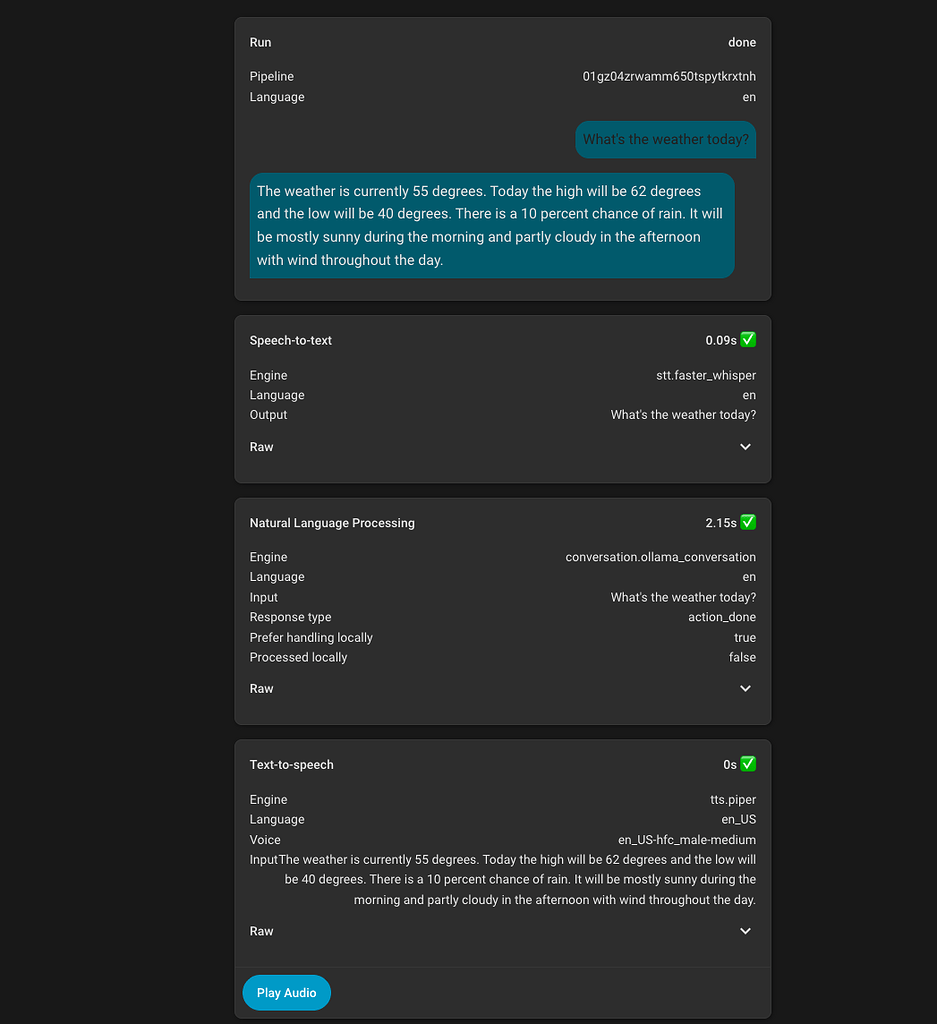
I started by trying to get weather working, the first challenge was getting the LLM to even call the weather service.
I have found that having dedicated#sections for each service that is important along with a bulleted list of details / instructions works best.
Then I needed to make the weather response formatted in a way that was desirable without extra information.
At first, the response would include extra commentary such as “sounds like a nice summery day!” or other things that detracted from the conciseness of the response.
Once this was solved, a specific example of the output worked best to get the exact response format that was desired.
For places and search, the problem was much the same, it did not want to call the tool and instead insisted that it did not know the user’s location or the answer to specific questions.
This mostly just needed some specific instructions to always call the specific tool when certain types of questions were asked, and that has worked well.
The final problem I had to solve was emojis, most responses would end with a smiley face or something, which is not good to TTS.
This took a lot of sections in the prompt, but overall has completely removed it without adverse affects.
NOTE: Not sure if a recent Home Assistant or Music Assistant update improved things, but the LLM is now able to naturally search and play music without the automation.
I am leaving this section in as an example, as I still believe automations can be a good way to solve some problems when there is not an easy way to give the LLM access to a certain feature.
It is certainly the most desirable outcome that every function would be executed perfectly by the LLM without intervention, but at least in my case with the model I am using that is not true.
But there are cases where that really is not a bad thing.
In my case, music was one of this case.
I believe this is an area that improvements are currently be made, but for me the automatic case was not working well.
I started by getting music assistant setup.
I found various LLM blueprints to create a script that allows the LLM to start playing music automatically, but it did not work well for me.
That is when I realized the power of the sentence automation trigger and the beauty of music assistant.
I create an automation that triggers onPlay {music}.
The automation has a map ofassist_satellitetomedia_playerin the automation, so it will play music on the correct media player based on which satellite makes the request.
Then it passes{music}(which can be a song, album, artist, whatever) to music assistant’s play service which performs the searching and starts playing.
The next problem to solve was the wakeword.
For WAF the default included options weren’t going to work.
After some back and forth we decided onHey Robot.
I usethis repoto train a custom microwakeword which is usable on the VPE and Satellite1.
This only took ~30 minutes to run on my GPU and the results have been quite good.
There are some false positives, but overall the rate is similar to the Google Homes that have been replaced and with the ability to automate muting it is possible we can solve that problem with that until the training / options become better.
I definitely would not recommend this for the average Home Assistant user, IMO a lot of patience and research is needed to understand particular problems and work towards a solution, and I imagine we will run into more problems as we continue to use these.
I am certainly not done, but that is the beauty of this solution - most aspects of it can be tuned.
The goal has been met though, overall we have a more enjoyable voice assistant that runs locally without privacy concerns, and our core tasks are handled reliably.
Let me know what you think!
I am happy to answer any questions.
I’m still playing with voice assistant, but did some stuff to get music working using media players and voice assistants linked to the same areas and music assistant.
This is an example of an sentence automation I use to play a music assistant playlist:-
How many entity’s are you exposing to Qwen 4B?
I’m using Qwen 14B non thinking and exposing just 53 entities makes it behave very unreliable.
Sometimes it appears to ignore or forget entities, sometimes features like brightness or volume are not set by the model.
You are describing context overrun.
Your entity description plus tool description plus full prompt cannot exceed the context window set by your model.
(default for qwen I think is 8K)look in ollama you will see it telling you how much it overran and adjust.
You can adjust the number of exposed ens, exposed tools shrink your prompt, or if you have enough vram and your model supports it, crank the context window of the model up.(or all of the above)
Sounds like you’re in 4 or 8k land and that would be expected at around 50 something depending on the length of your names etc.
Right now I have 32.
On top of what Nathan suggested, depending on which entities you have, maybe consider if all of those devices will be addressed individually.
You can create many different types of groups in HA which would only be one entity to pass in.
Thanks for the hint.
Infact I’m also using qwen3 4B instruct with its base 8k context.
Since I’m using an A2000 ADA with 16Gb VRAM I now doubled the context.
Results are better but not perfect.
For example „turn on the light in living room“ sometimes turns on a light in another room, or also a fan or socket.
I would love to use an 7-8B model of Qwen instruct.
Do you know of any available?
By the way, your post helped me a lot, please keep on updating if you make further progress.
Tank you!
Good suggestion, I started to group all the lights for reduced entities
You can absolutely fit gpt-oss:20b in a 16g card.
It’s my mainline local inference and tbh is WAY more capable than qwen.
You still have to manage the context but… Gibennthesamd context size, I’ve been more successful there.
InFridays party(no you don’t need the whole thing) I’m talking about building context how, what is needed and why.
If you’re fitting in context, and it still misbehaves, then you have a grounding problem.
Welcome to the see saw.
Too much context - not done right, too little context - not done.at all
Are you using the base qwen from Ollama?
This are typically quite heavily quantized which is why I recommend picking from hugging face and getting a better model.
Okay this is getting better and better.
I tryed loading the ollama version of gpt-oss:20B into my 16G card but it did not fit.
Any tips how i can make this work?
Also: I am looking for a way so voice assist can memorize things, like preferenes or own findings.
Is there any way to achive this?
initialy i was using the “latest” quant of huggingface, i think that is Q4_K_S.
Right now I am running Q8_0 - not sure if that’s optimal.
Any recommendations?
I’ll look at your card specifically on OSS 20 b but it was absolutely designed to fit ina 16G card… We should be able to figure it out.
Whatever model you do end up in push that context sincoyas big as you can without overrunning…
keep trying models.
You want long context, reasoning tool use models.
Also everything’s you just asked about is in the Friday thread… Sorry I’m 220 posts deep now but it’s in there mem needs some specific considerations and input the caveats there too.
Had an interesting issue I ran into.
I still prefer to haveuse local firstenabled as it is a tad bit faster, and the “chime” is more pleasant than “Turned on the light” response.
However, I was noticing some weird behavior when usingWhat is the weather?where the answer was nonsensical, but askingWhat is the weather today?correctly used the llm_intents script.
Now that Home Assistant 2025.12 shows you the tools / intents that are called and their responses, I was able to get more insight here.
It turns out that Home Assistant has a weather intentHassGetWeatherwhich was being called locally, but I didn’t have any weather entities exposed to assist so it was effectively trying to run that and then falling back to the LLM and the LLM was apparently just making up values based on the sensors it had access to.
For now I just overwrote the local intent by creating an automation that triggered on the sentenceWhat is the weatherand re-implemented the logic, using the AI Task service to summarize the information.
This is a workaround, I would really love it if Home Assistant exposed all of the intents that are available as well as a way to disable which ones you want to immediately hand off to the LLM.
Had some family visit for the holidays and that exposed some issues with the current setup.
The main problem being wake word activation, I found an improved OpenWakeWord training script for the ViewAssist device which helped.
However, the bigger problem was that anytime there was a false activation the LLM would always end the response with a question, which created a loop.
I had originally used a silence prompt to respond with" "but that seemed to cause issues where the speaker would make a static noise, and for some reason it seems less willing to say something like that vs a true word / phrase.
We also noticed that when we were trying to activate with a command, if it heard you wrong the response was way too wordy, it often gave examples device names or areas which is entirely unnecessary.
I adjusted my prompt for unclear request handling, and this has dramatically improved things.
I have created a script which leveragesFrigateand its Home Assistant integration to get information about what is happening on cameras outside.
This sends the current camera image to an AI task (must use a vision capable model) along with information from Frigate on the count and activity of object types.
This enables asking Home Assistant questions like “Who is at my door?” or “I just heard a noise in the backyard, do you see anything?”
Note the question time will be longer as it has to run the vision analysis as well.
Thats what I was looking for!
Many thanks setting this up.
This saves my time to do it on my own!
Great!
What “weather.forecast” provider / integration you are using.I have “weather.home”.
By using this, the automation breaks at my side at“UndefinedError: ‘dict object’ has no attribute ‘precipitation_probability’”
I usePirateWeather, that is interesting though that the format is different for some weather providers.
Different providers provide different things.
Most have temp and rainfall but the things like windspeed, UV, etc will be provider by provider.
Your tool should account for missing data and inform the llm what to do in case data isn’t available.
Yeah, I believe this is probably an issue withinGitHub - skye-harris/llm_intents: Exposes internet search tools for use by LLM-backed Assist in Home Assistant
Powered byDiscourse, best viewed with JavaScript enabled
Related Stories



Source: This article was originally published by Hacker News
Read Full Original Article →
Comments (0)
No comments yet. Be the first to comment!
Leave a Comment