
The Google I/O annual developer conference is around the corner—May 19—but in what is quickly becoming a tradition, Google announced new features for Android and Gemini a week early.
The news came on Tuesday via the second-ever Android Show on YouTube .
This livestreamed presentation helps Google spread out the cavalcade of updates from the often jam-packed I/O keynote.
The Android Show focused on new features in Android 17, the next version of Android coming later this summer, as well as several updates to the Gemini assistant experience.
It continues the theme set last year by Sameer Samat , president of the Android ecosystem, of turning Android into an “intelligent operating system.” Samat and his team aim to do this by adding a host of new AI-powered features to the mobile OS, including a generative AI widget-creation tool and an improved voice-to-text model that uses AI to cut those “ums” and “ahs” as you speak.
What if you don't want AI baked into your phone?
“A user always has control,” says Mindy Brooks, vice president of product management on the Gemini Intelligence experience.
“They can turn it off, they can make a choice, and we are very clear about providing those tools for them to make the choices that work for them.
We really wanted to focus on bringing features that are aligned with what users are saying they want and need.”
Here's everything you need to know about what was announced during the 2026 Android Show.
And if you want to learn more about the newly announced Googlebook platform for laptops, we've got you covered here .
Google is officially packaging many of the new Gemini features it introduced on flagship smartphones in recent months as “Gemini Intelligence,” which brings the best of Gemini to some of the most advanced devices on the market.
That means many of these features aren't necessarily tied to Android 17, and will roll out in waves starting with Samsung Galaxy and Google Pixel phones this summer, as well as smartwatches, cars, smart glasses, and laptops later in the year.
There's a new visual indicator when Gemini is “thinking” and working on your behalf, and you'll see these visuals pop up throughout the operating system.
Google debuted Gemini Task Actions a few months ago, allowing you to ask Gemini to book an Uber or order your favorites from DoorDash.
When you trigger a task, Gemini opens a virtual app experience and runs through the motions while you can continue using your phone for something else.
When it has completed the task and needs you to press a button to place an order or book a reservation, it'll ping you to make that final call.
These actions are expanding to support more apps and services, and it may not even be necessary to have a specific app installed, as Gemini can handle these tasks via the Chrome browser.
So if you see an interesting brochure while traveling, you can snap a pic and ask Gemini to “find a tour like this on Expedia for four people.” Gemini will either run the action through the Expedia app if you have it installed or head to Expedia's website in Chrome.
“We are moving toward a world where it starts to work in a much more comprehensive way,” Brooks says.
“You're going to see it available to many more apps, and also, I think the really exciting thing is Chrome's automation on Android being expanded as well.
Those two things combined will really create a comprehensive automation suite for our users.”
Speaking of Chrome's automation upgrade, Android users will be able to deploy Gemini as a browsing assistant in Chrome starting in late June.
Google says Gemini can help research, summarize, and compare content on the web, and you can call on it to handle an appointment booking or reserve a parking spot.
For example, if you go to SpotHero's website to find a parking spot—instead of entering all the details manually and making the reservation, you can ask Gemini, and it'll do the job for you.
Google says connecting Gemini to Autofill is opt-in, and you can turn it on or off in your settings.
“Our goal is to be able to have it as customizable as possible, pulling from all sorts of data sources that you ask it to be able to create a custom widget for you,” Brooks says.
Maybe that means creating a weather widget that shows Celsius and Fahrenheit for when you're traveling abroad.
Or a countdown to your next marathon.
Or a widget that shows three new high-protein meal prep recipes every week.
The voice dictation feature on Google's Gboard keyboard is getting a Gemini upgrade.
A new feature called Rambler smartens voice-to-text; Gemini will understand when you say “um,” “ah,” and “like,” and will remove those verbal fillers from your dictated text.
If someone interrupts you while you're dictating and you respond, Gemini will cut that part from your transcription so you don't have to delete a bunch of words and start over.
Moving on from AI-focused improvements, Android 17 will debut an easy way to create a reaction video.
You know those videos on social with the person in the corner talking and a webpage or app about what they're reacting to in the background?
You can now record yourself and your screen simultaneously without dealing with third-party apps or a green screen.
This feature will roll out to Pixel devices first this summer.
Upgrades to Instagram and Edits
There's a major collaboration with Meta in Android 17 to improve the Instagram camera experience.
That includes adding Ultra HDR support for capture and playback, support for built-in video stabilization, and integration with your phone camera's night mode.
Instead of using your phone's camera and then adding those images or videos to post on Instagram, the idea is that with these improvements, you can now rely on the native Instagram camera experience without losing image quality.
Another Meta partnership, Android 17 gets some exclusive tools in Instagram's Edits app , like Smart Enhance, which uses on-device AI to upscale photos and videos.
Sound separation will also separate audio tracks from wind, noise, and music, and let you boost sounds and cut out the stuff you don't want to hear.
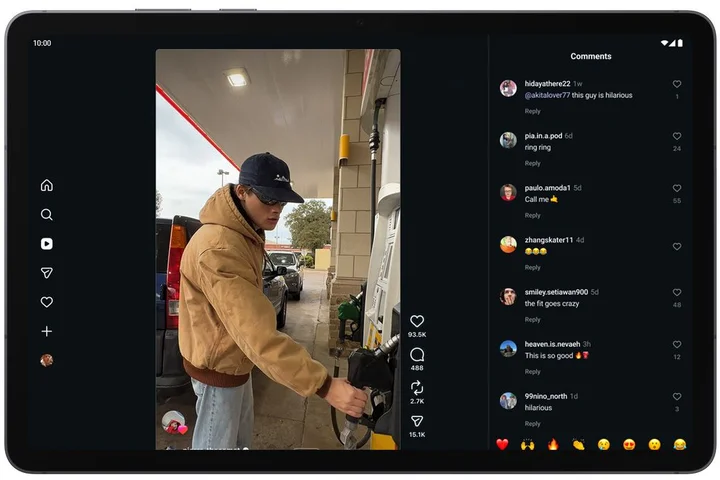
Google says the Instagram app is now fully optimized for tablets, making use of the larger screen space.
Also, Google says Adobe is bringing its popular video editing app, Premiere, to Android (following its launch on iOS last year ), with exclusive templates and effects for creating YouTube Shorts from the app.
Every few years, Google redesigns the way emoji appear on its platforms.
Remember blob emoji ?
(RIP.) Now it's time for another shake-up with Noto 3D.
These new 3D emoji aren't a dramatic change from the existing crop, though the flat shapes are gone in favor of more depth and realism.
They'll be available across Google's software starting with Pixel phones later this year.
Instead of going cold turkey and switching to a dumb phone , there's a new tool in Android 17 that’s designed to make your smartphone usage more intentional: Pause Point.
You can enable this on “distracting apps,” and Pause Point will give you a 10-second window asking why you opened the app, offering alternatives, like a breathing exercise, or the ability to set a timer for the app so you don't spend too much time watching Instagram Reels.
It might suggest another app, like an audiobook.
It's meant to be a middle ground between app timers and more restrictive tools like the Brick , which disables an app from launching once you've tapped your phone on the physical device.
Google says it will launch more digital well-being tools later this year.
Android Auto has a brand-new look, and it can now adapt to any dashboard screen size or shape, be it round, rhomboid, or rectangular.
Google Maps bleeds edge-to-edge, taking up the full screen, and you'll finally see the Material 3 Expressive design language that Google introduced last year, with expressive fonts and smoother animations.
There's broader widget support, and Google's new Immersive Navigation, which shows a 3D view in Maps with more detailed buildings, terrain, lanes, traffic lights, and more.
Most new cars have screens for passengers to watch media, and Google says the new Android Auto experience supports 60 frames per second in Full HD and Dolby Atmos for select car brands.
And if you're playing media on the main driver's display—like a video podcast—it will transition to audio-only when the car switches to drive mode.
Other apps like YouTube Music and Spotify are also getting a visual glow-up to be even easier to use in Android Auto.
Gemini is already available in Android Auto, but Google says if you have a phone that supports Gemini Intelligence, you'll be able to access extra features in the car.
For example, if a friend asks for an address while you're driving, Google's Magic Cue feature—which debuted on the Pixel 10 series last year —will search through your calendar, emails, or texts for the answer and offer a one-tap response.
That also means Gemini Task Automations are available, allowing you to ask Gemini to order from a specific spot on DoorDash for pickup.
All you'll need to do is confirm the order with a tap after Gemini puts your request into a cart.
And for anyone with a vehicle with "Google built-in"—that's where Google worked with the car brand to integrate its software with the vehicle's hardware—there are some new capabilities, too.
There will be support for meeting apps, so you can take Zoom calls from your dashboard.
Gemini can also answer questions about your specific car, like tell you if that warning light is cause for concern.
And because the software can tap into the car's hardware, you'll be able to get live lane guidance via the vehicle's front-facing camera straight in Google Maps' Immersive Navigation.
Google says these features will be rolling out “throughout the year.”
We've got more details on the Googlebook in a separate story , including some of the capabilities the company teased, how the new platform works with Android phones and iPhones, and the “glowbar” that's designed to make the laptops instantly identifiable.
Here are a couple of other noteworthy improvements in Android 17.
Related Stories



Source: This article was originally published by Wired
Read Full Original Article →
Comments (0)
No comments yet. Be the first to comment!
Leave a Comment