
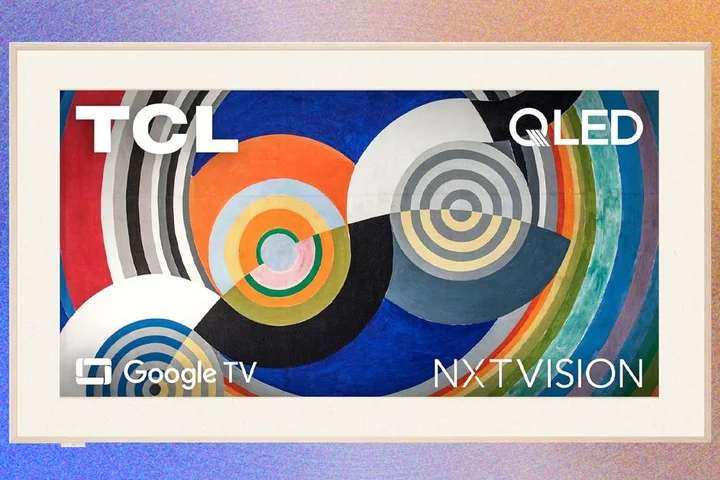
The TCL NXTVISION is an art television that’s all about stark contrasts.
On the one hand, it’s affordable and uses a color-accurate matte display.
Because it’s powered by Google TV, the NXTVISION television is also easy to use, and you can mount one on a wall with the included light brown bezels.
However, the actual performance—including poor contrast ratio—made this model less compelling.
If you nab one at a low price, it’s an excellent choice for digital artwork, but a middling TV.
I’m a fan of art televisions and how they provide some usefulness even when they’re turned off.
The TCL NXTVISION is thin (at about 1 inch) and supports HDR, HDR10+ and Dolby Vision, but the backlighting system isn't as good as TCL's standard models .
It's solidly built: I was surprised how heavy it is at 50 pounds for the 65-inch model I tested.
I spent a lot of time comparing the TCL NXTVISION to Samsung and Hisense's art televisions, because they have a similar intended purpose.
The first differentiator with the NXTVISION is that it comes with one set of light brown bezels.
With Samsung The Frame and The Frame Pro , you have to buy them separately for $199, but you get more color options.
The bezels snap into place using magnets.
The included feet snap into slots but require screws to hold them in place.
As an aside: I like how the Samsung feet do not need screws, but most TVs don't do this.
On the back, there are four HDMI ports, and you have a choice about how to use them.
HDMI 1 and HDMI 2 both support a 144-Hz refresh rate for gaming in 4K with better fidelity (or 240 Hz if you want to connect a PC and use 1080p resolution).
However, HDMI 1 is the eARC port for running audio out to a receiver or soundbar, which leaves three open ports for other things.
I had trouble connecting HDMI cables since the ports are on the back and point up; they're hard to find in a dark room.
I prefer the Samsung The Frame Pro, which offers a breakout box for connecting all of the devices for far less cable clutter.
I liked the remote just fine, but it initially had some issues with pairing and voice control that were resolved by resetting everything (including the TV itself, not ideal).
I don’t like the volume and mute buttons on the side: They are hard to find initially unless you know they are located there.
I was here for the artwork, because the TCL NXTVISION has a matte display and accurate color.
While The Frame Pro includes 5,000 pieces of art, including several Andrew Wyeths and a few masterpieces, the NXTVISION only includes 350 art images.
Worse, you can’t search for them; you can only scroll through a few categories to find the one you want.
The AI generator isn’t bad, on par with Samsung and Hisense offerings; I generated an ocean scene by choosing a few keyword prompts and left it on the screen for an entire week.
TCL says there are a hundred thousand possible AI combinations.
I compared the NXTVISION to the Frame Pro side by side using the same artwork and realized there is a noticeable difference.
Van Gogh’s Starry Night seemed to have an actual texture on The Frame Pro thanks to the better contrast.
Artwork on the TCl NXTVISION didn’t have the same appeal but was still passable.
If the NXTVISION really does cost $900 instead of the normal $1,800, it’s still worth considering.
If you want the absolute best representation of digital art, The Frame Pro is a much better choice.
You might leave a painting on all day, but at night, you are ready to settle in with some popcorn and a movie.
I noticed problems with contrast right away when I watched the movie Sisu: Road to Revenge on Netflix.
What should look bright and colorful during a scene involving swooping airplanes and a crusty commando ended up looking a bit dull and lifeless, almost like watching a movie on a computer monitor.
No matter how many settings I tried (cinema mode, raising the brightness, using AI optimizers), the screen looked washed out.
In the movie The Creator on Netflix, an early beach scene at night looked too gray without the typical richness of a better display.
Thankfully, live broadcasts over an antenna and some of the free channels (from both Google and TCL) for sporting events had a little more vibrancy.
During my typical benchmark tests, I found some of the images and clips to be a bit lifeless with poor contrast.
A smoky morning scene with horses looked washed out compared to the Frame Pro showing the same images.
Skin tones were also too flat in almost every test clip.
I also watched the twisty time travel movie Mike & Nick & Nick & Alice , which looked about as muddy as Sisu .
Initially, streaming over Hulu from my iPad over Apple AirPlay, the stream kept stuttering and pausing.
I’m on a 600-Mbps fiber connection and a mesh network, so it wasn’t my signal.
After pausing the stream myself for a few minutes, it finally worked.
An early scene in a house confirmed to me that the contrast is a problem: I could barely make out faces.
I also watched a trailer for Harry Potter that’s coming on HBO and it lacked vibrancy.
Passing the Crimson Desert T est
Why the noticeable difference?
It has everything to do with the high-end computer I connected using HDMI.
I used an Acer Nitro 60, and with the Game Master mode, the 144-Hz refresh rate, and the high-resolution 4K quality of the game, the mountain vistas looked as good (if not better than) they did using the same type of connection on the Frame Pro.
Still, my final verdict is not exactly positive.
Since the NXTVISION is expected to go back to $1,800 in April, that means it’s actually more expensive than The Frame Pro at $1,600.
The Hisense Class S7 CanvasTV is only $900 (not on sale) and has a matte finish, 144-Hz refresh rate for gaming, and provides over 1,000 art images.
Given that the TCL NXTVISION doesn’t look that great for streaming, it’s hard to recommend when others offer so much better art.
Related Stories



Source: This article was originally published by Wired
Read Full Original Article →
Comments (0)
No comments yet. Be the first to comment!
Leave a Comment