
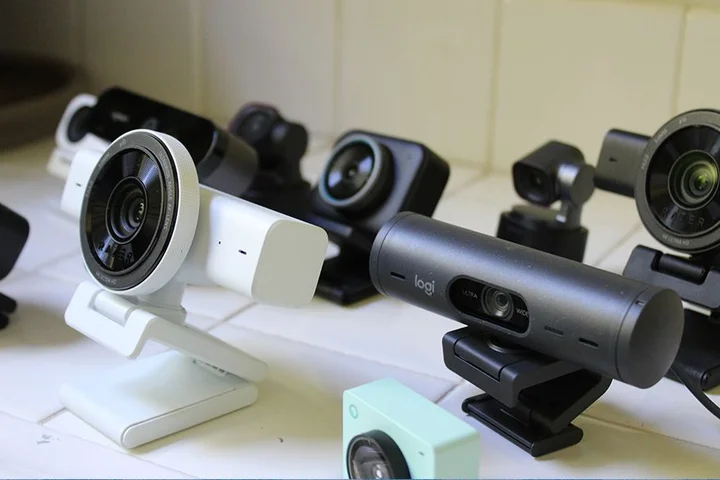
It's very difficult to measure the quality of the best webcams without having them side-by-side.
Every webcam I've ever tested handles light differently, and subtle variations in a room—where your windows are, what colors are on your walls—can change your perception of the quality of a webcam.
Updated May 2026: I completely overhauled this guide, with new picks and new write-ups.
I also updated links and prices.
After testing over 15 webcams, there was a clear winner that had the best image quality, microphone, and design, without charging extra.
That's the Insta360 Link 2C Pro ($200) .
I absolutely love the design.
It's remarkably compact and light, meaning it works as well on a laptop as it does on a monitor.
That alone makes it a unique design that most other webcams can't compete with.
The Logitech MX Brio is almost three times heavier, which was our previous choice for best overall webcam.
The Insta360 Link 2C Pro magnetizes to the very strong, aluminum mount, and I never worried about it falling back, even with the weight of the USB-C cable pulling on it.
This also makes it super smooth to adjust the pan left and right with your finger.
It's surprising how many webcams struggle with this very simple motion.
A lot of mounts are plastic, such as the one on the Logitech MX Brio.
And because it's magnetic, it can also stick to any other metal surface, which can be convenient if you're looking for a different angle to shoot from.
And then, there's the image quality.
No webcam at this price delivers low-light performance on par with the Insta360 2C Pro.
Like all the cameras, I tested it in some poor conditions, including under overhead office lighting and backlit.
It handled these scenarios better than the other webcams, especially in the situation with a lamp on in the background.
Right out of the box without even tweaking any settings, I was really impressed by the way Insta360 Link 2C Pro handled harsh light.
Unlike the others, it avoided blowing out the highlights and delivering as much detail in the image as possible, even compared to more expensive webcams like the Obsbot Tiny 3 ($350) .
I also noticed the very natural contrast in the image processing compared to options like the Logitech MX Brio, which tended to crush blacks.
Under better lighting, the sharpness of the image really stood out.
Thanks to that large 1/1.3-inch CMOS sensor, objects in the background fall out of focus in a natural bokeh effect.
It mimics the look of a DLSR better than any camera I tested.
Other webcams look flat by comparison.
It's not perfect—no webcam is.
Sometimes there's a bit too much processing and smoothing for my taste, especially in some of the details around the face.
And out of the box, the colors skew a bit cool.
That can be adjusted in the easy-to-use software, but it's something to be aware of.
Hopefully, by now, you'll be convinced that there's little reason to buy the Logitech MX Brio over the Insta360 2C Pro.
Logitech has a lot of brand equity in the world of webcams, but considering they're both at $200, Insta360 definitely has the superior product right now.
The standard Insta360 Link 2C ($150) is also really strong, however.
It's $50 cheaper, and it has a slightly smaller sensor and narrower aperture, resulting in worse low-light performance.
I noticed more noise introduced, especially in areas of high contrast, such as along my hairline.
But let's be real: although you can hunt down the differences between these two webcams, the standard Link 2C still punches above its weight for the price.
One of biggest disadvantages against the non-Pro model, though, is in microphone quality.
The Insta360 2C is more in line with other webcams I tested.
It uses just a single microphone and lacks the ability to pick up the deeper frequencies in my voice, whereas the 2C Pro uses a dual-microphone beamforming system that does a far better job capturing the fuller spectrum.
I still think that the Insta360 Link 2C is one of the best options at around $150, though, handedly beating out options like the Razer Kiyo V2 and Logitech Brio 4K .
Cheap Webcams That Get the Job Done
Proceed very carefully with the following recommendations.
That's especially true if you are working from a laptop or already have a decent webcam.
In general, I suggest dishing out some extra cash for one of the more premium options listed above, or instead buying a light.
Even something simple like the $50 Logitech Litra Glow will dramatically improve the quality of your video calls over buying a budget webcam.
That said, if you're using an external monitor and need a webcam to pair with it on a budget, there are a couple of decent options out there.
Of course, there are lots of cheap cameras on Amazon you could take your chances on, but the Anker PowerConf C200 ($60) is the best of the bunch that I've tested.
It has issues, such as the built-in mount, which can't swivel left or right.
It also doesn't grip to the monitor as much as I'd want.
While the 5-megapixel camera can't compare with the larger sensors in the more premium webcams, the image quality is decent enough, especially if you have decent light in your room and you don't mind tweaking the picture quality in the software.
I'd also hesitantly recommend the Logitech Brio 300 ($60) .
Like the C200, it has a number of deficiencies, this time including an unappealing sticky pad built into the integrated mount and the built-in cable.
The microphone also won't be much of an upgrade over the ones built into MacBooks, although it's still better than built-in mics on many of the Windows laptops I've tested.
I also don't like that the Brio 300 has a fixed 70-degree field-of-view, which gives it a smaller framing than all the other webcams I tested.
That's a lot of complaints, I know.
But if you just need something simple and “good enough,” the Logitech Brio 300 will do and certainly has better lowlight performance over an older option like the Logitech C920.
If you have decent lighting in your room, the Brio 300 will still be an upgrade over your laptop's webcam in terms of image quality.
The gap between the $150 and $50 is pretty wide, but honestly, there aren't a lot of great options in between that I've tested.
Check in my honorable mentions down below for some other options in between, but truthfully, I haven't yet seen a $100 webcam that actually feels like it's worth the extra money.
One I'm looking forward to testing in my next round is the Anker AnkerWerk C310 , the 4K upgrade over the C200 from a few years ago.
It comes in right at $100 and has a larger 1/2.5-inch sensor.
There are a couple of good options, but the best is the Obsbot Tiny 3 ($349) .
That's too bad, as it's also the most expensive webcam I tested at $349.
That's likely more than most people want to spend on a webcam, but it did produce the overall best color accuracy.
This camera replicated real-life color without looking overprocessed, better than any other webcam I tested—even beyond what the Insta360 cameras can do.
I still prefer the lowlight performance of the Insta360 cameras, but the Obsbot Tiny 3's colors are more natural.
It can even shoot in 120 frame per second in 1080p, though I'm not sure quite what the use case is for that.
Obsbot has a cheaper version as well, the Obsbot Tiny 3 Lite ($179) , which very well may be the PTZ webcam that most people should buy due to the lower price.
It's a minor step down in image quality, as it uses a small camera sensor.
Most notably, you don't get as much of that natural background blur and the lowlight performance isn't as strong.
But it's one of the most affordable ways to get the PTZ features without too much of a downgrade in quality.
And really, it's those PTZ features that you buy these cameras for anyway.
In its latest release, Obsbot has introduced lots of interesting new ways to control the gimbal using AI.
It can track objects, follow your voice, and gives you a few audio modes that would be helpful in specific use cases.
For example, one might.
There's even a feature that allows you to use preset voice commands to control the gimbal, such as choosing between preset angles or zooming in.
All of the previous software features are still around too, which are too extensive to list here, but include setting up customizable preset angles, desk mode, multiple speeds of head tracking, and so much more.
There's ton to play around with, which is what makes these PTZ camera so fun.
If you do like the design of the Insta360, though, the company has a PTZ version of the Link 2C Pro that I recommended above.
The Insta360 Link 2 Pro ($250) has the exact same picture and microphone quality, with the additional features of being able to pan, tilt, and zoom.
(There's also a cheaper model, the Insta360 Link 2 ($200) .) The main benefit it has over the Obsbot Tiny 3 is that it's a full $100 cheaper.
That's significant, even if the color accuracy isn't quite as good.
For what it's worth, I preferred the way it handled the lowlight scenarios slightly better than the Obsbot Tiny 3.
The Tiny 3 was definitely overexposed right out of the box.
Though the Insta360 Link 2 Pro is not quite as full-featured as the Obsbot cameras in terms of AI trickery, I do like that you can control the gimbal using your phone to make adjustments.
Instead of having to rely solely on the desktop software or voice commands, the Insta360 cameras let you quickly pull up controls in a browser on your phone after scanning the QR code, which is super handy.
Before You Buy, Try Using Your Smartphone
You may not need a dedicated webcam at all.
It's actually really easy to use your smartphone's cameras as a webcam instead, and they're usually far superior.
Recent iPhones, for example, have a feature called Continuity Camera —this works with certain MacBooks and allows you to wirelessly use the iPhone's camera as a webcam.
Apple even sells a Belkin mount ($30) that lets you hang your iPhone off the top of your MacBook or external monitor for the full effect.
iPhone Mount With MagSafe for MacBooks
Google Pixel phones also now feature wired webcam support.
All you need to do is plug in a Pixel to your computer and choose the Webcam option for it to work.
You'll just need a tripod to keep it propped up; something like this Joby GripTight will do the job.
Don't have either of these devices?
Don't fret.
We have a full guide on How to Use Your Smartphone as a Webcam with multiple methods, no matter what PC or phone you own.
Got a professional camera?
We have a guide on setting it up as a webcam too.
An easy way to improve your existing webcam is to add a light source .
Webcams have small camera sensors so they often need a lot of light to deliver good results.
Webcams also have poor microphones.
Some are better than others, especially on the high-end.
They'll do the job but you'll probably sound tinny.
If you own a MacBook Pro, you may find that its mics actually sound better than the built-in mic in the webcam.
Videoconferencing apps let you choose which mic you have to use, so just because you have a separate webcam doesn't mean you have to use its built-in mic.
Another option is to upgrade to a USB mic .
Logitech Blue Yeti Nano USB Mic for $95 : These microphones are the standard-bearer in the world of USB microphones, and the Nano packs everything most people need in a smaller footprint.
Plug it into your computer and once you choose this mic in your video-calling settings as the default, you'll immediately start hearing the compliments from people on the other end.
Read our Best USB Mics guide for more details.
Also, it's important to consider that 4K webcams often shoot at 30 frames per second, but often give you 1080p at 60 frames per second.
I should note, though, that while 4K cameras often can shoot in 1080p, they are being downsampled and can sometimes result in artifacts or messy details.
Understanding Megapixels, Resolutions, and Sensors
What matters with a webcam is the picture quality, but there are a number of camera specs that play into that.
For starters, what we usually just call “resolution” is the pixel count of the final image, usually either 1080p, 1440p, or 4K .
The sharpness of this final image is important, but it doesn't alone tell the whole story on image quality.
The camera sensor itself also has a resolution, which is usually referred to in terms of megapixels, which is just the total number of pixels (rather than resolution, which uses a width by height dimension).
More megapixels can produce higher-quality images, but the physical size of the sensor is also important.
A larger sensor with a lower megapixel count will often result in better images.
These also have confusing labels attached to them, unfortunately.
The bigger sensor the better, so a 1/1.3-inch sensor (which is as large as webcam sensors get right now) is preferred over a 1/2-inch sensor.
There is, of course, other important parts of cameras, such as aperture of the lens, which controls how much light is captured and can effect low-light performance.
Most webcams have an aperture of f/2.0, but some models that have better low-light performance, like the Insta360 Link 2C Pro , have a wider f/1.9 aperture.
Lastly, the image processing has a lot to do with the final quality of the image.
Webcams these days use lots of AI-based image processing to sharpen and balance the image around your face, including filtering out noise and smoothing out skin tone.
Most of us want this to look as natural as possible, and there's no question that some webcams are too heavy-handed.
YoloCam S3 for $199 : This one's promoted all over social media these days, and I like its ability to easily shoot in portrait.
Just flip it around on its magnetic stand, and you're instantly shooting social media-ready content.
Its low-light performance isn't as strong as other options at this price, however, and it was buggy out of the box when tested across multiple devices.
But it's still the strongest competitor to the Insta360 Link 2C Pro of anything I tested.
Razer Kiyo V2 for $150 : I love the click of the physical shutter closing, but the lowlight performance was a bit disappointing, especially for how large it is.
The new white colorway that I tested is pretty, though, and for the price, the image quality isn't bad.
The Razer Kiyo Pro Ultra is in this same line, which is the webcam that creates the most natural bokeh effect, but it also costs $400.
Obsbot Meet 2 for $129 : This is by far the smallest and lightest webcam I tested, making it a solid option for laptop users.
That compact size also means a smaller sensor, though so lowlight performance wasn't its strong suit.
I'd still take this over the Logitech Brio 500 though.
There's also the 1080p Obsbot Meet SE ($69) that I plan to test in the future as a solid midrange option.
Logitech MX Brio for $200 : It produces decent 4K image quality, but for the price, I prefer the Insta360 Link 2C Pro's image processing, lowlight performance, and microphone quality.
Don't Bother With These Webcams
Logitech C920 for $100 : It's hard to believe this old webcam is still being sold and purchased, despite being 14 years old.
It was the go-to webcam for many, many years, but it's not worth buying in 2026.
You'll also see variants of it out there, such as the C920x, C920S, and C920e, but none improve the basic image quality.
Emeet SmartCam S800 for $60 : Getting a 4K resolution at this price is tempting, but the out-of-the-box color accuracy is rough, producing an overly green image.
This can be tweaked in the software, but I also found that it has an oversharpened effect that gave it a fake digital effect.
I just couldn't get this to look how I wanted it to.
Logitech 4K Brio for $150 : It's too expensive for the quality, especially with how oversaturated the colors look.
It is, however, one of the only webcams that supports Windows Hello facial authentication.
Emeet Pixy for $90 : This PTZ webcam is undeniably cute, resembling a little robot friend hanging out on your monitor.
It actually uses two cameras to speed up autofocus and support AI features.
The autofocus is fast, but I didn't notice it was any quicker than other high-end cameras.
The low-light performance really suffers, though, the microphone is awful, and it's a far larger PTZ webcam than the others on the list.
Logitech Brio 500 for $130 : This isn't a bad webcam per se, but it's just not worth $130.
I don't like the integrated mount or cable, and the lowlight performance can't compete.
You can spend even more on the Brio 505 , which is the same camera, except it comes with a removable USB-C cable.
Related Stories



Source: This article was originally published by Wired
Read Full Original Article →
Comments (0)
No comments yet. Be the first to comment!
Leave a Comment