
PC Gamer's got your back Our experienced team dedicates many hours to every review, to really get to the heart of what matters most to you.
Find out more about how we evaluate games and hardware.
Okay, so you're in the market for an OLED monitor.
You want the latest panel tech, but you're trying to keep the spending just on the sensible side of silly.
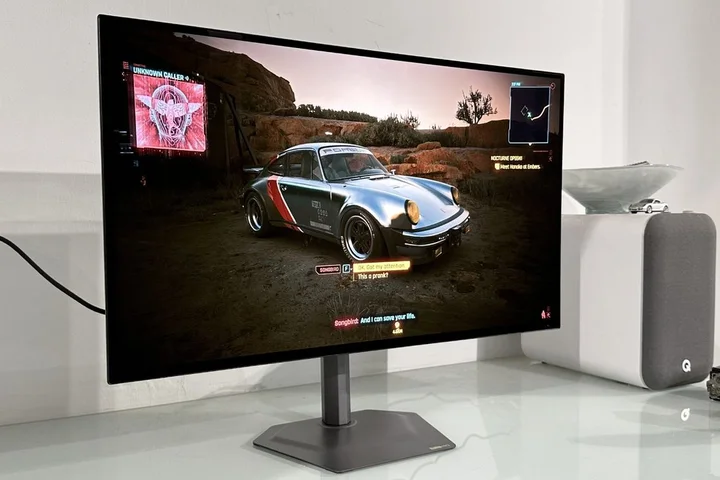
If that's a scenario you can identify with, may I introduce the new Gigabyte MO27Q28GR .
It's a 27-inch 1440p model, which remains a very popular form factor for what you might call real-world gaming.
What with GPU prices stubbornly refusing to normalise, never mind the memory market madness , 1440p is a manageable resolution for relatively modest graphics cards to drive, is the point.
The MO27Q28GR, meanwhile, runs at 280 Hz, which will be quick enough for all but die-hard esports addicts, offers plenty of connectivity and it's yours for around $599.
Immediately, you'll note that there are cheaper 27-inch OLEDs on our monitor deals page .
But hang on, because they don't have LG's new 4th Gen LG Primary RGB Tandem OLED panel.
335 nits full-screen, 1,500 nits HDR 1.5% APL
LG WOLED panel, adaptive sync, HDMI 2.1, DisplayPort 1.4, USB-C with 18 W (45 W dynamic) PD, USB-A hub
✅ You want the latest OLED tech: The Gigabyte MO27Q28GR sports LG's latest WOLED panle tech, so it's brighter and punchier than previous generations.
❌ You want a crispy, high-DPI experience: This is a 1440p panel, which is a good compromise for gaming but doesn't make for sharp fonts and lots of desktop space.
If that sounds like a real mouthful, it is.
But suffice to say for now that it brings very nearly all of LG's latest OLED tech to the table, with the notable exception, despite the confusing "RGB" branding, of RGB-stripe subpixel structure.
We'll come back to all that in a moment, but in the meantime—and especially if you're confused— I précised the baffling branding applied to OLED tech by LG and Samsung here .
Just be warned, it's a bit of a mess.
The branding, that is, not my post.
Obviously.
Anywho, specs-wise, we're talking 335 nits full-screen brightness and HDR True Black 500 certification, both of which betray the new-gen panel tech, as does the 1,500 nits peak HDR brightness in a fairly teensy 1.5% window.
The 0.03 ms claimed pixel response time is essentially the same as previous generations of LG and indeed Samsung OLED panel tech.
But then that's arguably fast enough to make pixel response a "fixed" problem.
Keep up to date with the most important stories and the best deals, as picked by the PC Gamer team.
Oh, and did I mention that the "R" suffix in Gigabyte MO27Q28GR indicates that this is a glossy OLED, which is branded "RealBlack Glossy" in Gigabyte land.
There's also a Gigabyte MO27Q28G sans "R" with a matte anti-glare coating, if you prefer.
Rounding out the speeds and feeds out is a three-year warranty.
The question of OLED panel resistance to permanent burn-in rolls on, at least to some degree .
But at least you know you're good for three years with that warranty backstop.
All of that is wrapped up in a pretty classy looking, minimalist chassis with a slick metal base and stand, the latter offering a full range of adjustment, including pivot into portrait mode, if that's your occasional web-viewing bag.
Overall it's a slick but mature monitor and doesn't suffer from any obviously gamery styling pretensions.
For me, personally, that's a positive.
Right out of the box it's immediately obvious that this new panel is an improvement on previous generations of LG OLED.
I've not been much of a fan of LG OLED panels thus far, finding them dull and a bit disappointing compared to Samsung's competing QD-OLED tech, even allowing for the latter's shortcomings when it comes to ambient light and also an overly warm colour temperature.
But this new LG panel tech, boy, it has a lot more punch.
The caveat is that your mileage will depend on everything from your use case and preferences to properly dialling this monitor in.
However, if you're willing to put up with more variability in brightness, you can wind down the APL and wind up the visual sizzle, in which configuration, this monitor pops so much more.
Is it as punchy still as an LCD with mini-LED backlight?
Nope.
But if, for instance, you tend to run your apps in dark mode, which essentially means lighting up less of the panel, then this monitor has plenty of fizz and largely covers off the criticism that full-screen brightness is a major OLED weakness.
That said, there's also the comparison with the latest and brightest Samsung QD-OLED panels and here, in subjective terms, I'd still have to give edge to Samsung with the proviso that even the very latest QD-OLED tech, as seen in the likes of the MSI MPG 341CQR QD-OLED X36 , still has a slight issue with purple tint in strong ambient light and a colour temp skewed warm.
If all this sounds rather abstract, what it translates into when you're gaming is a seriously punchy HDR experience in some circumstances.
Inevitably, that's most notably the case in darker scenes with some small, bright highlights, where the details absolutely zing.
And, of course, as with all OLED panels, there's perfect per-pixel lighting where off actually means off and thus there's zero light bleed, no halos around brighter objects, no backlight zones clumsily pinging on and off.
You get the idea.
In brighter scenes, even this improved LG OLED panel very slightly underwhelms.
That's true even with a feature Gigabyte calls HyperNits.
It's essentially the same as MSI's EOTF Boost mode, as included with the MSI MPG 341CQR QD-OLED X36 panel I mentioned previously, and what it aims to do is maintain broader scene brightness in the HDR 1500 mode.
Typically, the maximum peak HDR brightness modes on OLED panels allow for really high peaks but tend to crush overall scene brightness; HyperNits addresses that by boosting the EOTF curve.
HyperNits works in the sense that it allows you to have a single HDR mode that maximises both peak HDR brightness and overall scene full-screen brightness.
What it can't do is improve the panel's actual full-screen capabilities.
And, indeed, in really bright gaming scenes, pretty much any mini-LED LCD monitor would blow all OLED panels away for outright full-screen punch, albeit they come with an extensive litany of shortcomings specific to that panel tech.
For the record, Gigabyte has calibrated this monitor pretty nicely for the most part.
The SDR colours in default sRGB mode are pretty much bang on, as is the calibration of SDR content in HDR mode.
The catch is that the excellent calibration of SDR content in HDR mode only applies to the HDR True Black 500 mode.
In HDR 1500, the SDR colours are a mess.
That doesn't impact actual HDR content, including games and video.
But what it does mean is that if HDR 1500 is your preferred mode—and you'll need to use it to reach the highest of HDR peaks for smaller details—then you're going to need to enable and disable HDR in Windows depending on content type and usage.
Not a deal breaker, but a bit of a pain all the same.
The panel tech used here does not include LG's so-called RGB-stripe subpixel structure.
One final detail to note regarding the panel tech used here is that it does not include LG's so-called RGB-stripe subpixel structure.
It sticks with the RGWB or red, green, white and blue subpixels.
I won't rehash the implications of that here in detail, but the short version is that font rendering slightly suffers and the subjective experience of the rated panel brightness can't quite deliver on the expectations raised by the specifications.
That's particularly the case thanks to the relatively low 1440p resolution, which amounts to 2,560 by 1,440 pixels.
You can, of course, get a 32-inch 4K OLED for about $100 more and Gigabyte itself will do you a 27-inch 4K OLED for a mere $50 more , which really does deliver crispy, sharp visuals.
But then with that comes so much more GPU load.
That's the problem.
Actually, before we wrap up, in all this I'm forgetting what a seriously zippy display the Gigabyte MO27Q28GR is thanks to that 0.03 ms pixel response and 280 Hz refresh.
In the interests of full disclosure, I hung my Counter-Strike Desert Eagle up some time ago.
So, I have to confess my esports chops aren't what they used to be.
But I still maintain this monitor is plenty fast enough for the comfortable majority of gamers.
If you're super serious about online shooters, well, you know who you are and lower latency is certainly available at this price point.
That's obvious enough.
For everyone else, this monitor has to be close to where it's at if you're looking for a vaguely sensible money 1440p OLED gaming monitor with the latest panel tech.
It's really pretty sweet.
1.
Best overall / 4K: MSI MPG 321URX
2.
Best budget 4K: Asus ROG Strix XG27UCG
4.
Best budget 1440p: KTC H27T22C-3
5.
Best 1080p: AOC Gaming C27G4ZXE
6.
Best Ultrawide: Gigabyte MO34WQC2
7.
Best budget ultrawide: Xiaomi G34WQi
8.
Best 32:9: Samsung Odyssey OLED G9
9.
Best dual-mode: Alienware AW2725QF
👉 Check out our full gaming monitor guide 👈
Jeremy has been writing about technology and PCs since the 90nm Netburst era (Google it!) and enjoys nothing more than a serious dissertation on the finer points of monitor input lag and overshoot followed by a forensic examination of advanced lithography.
Or maybe he just likes machines that go “ping!” He also has a thing for tennis and cars.
You must confirm your public display name before commenting
Please logout and then login again, you will then be prompted to enter your display name.
Related Stories



Source: This article was originally published by PC Gamer
Read Full Original Article →
Comments (0)
No comments yet. Be the first to comment!
Leave a Comment